The Classroom Journal Designed by and for Conservatory Teachers

Forget the chaos of paper notebooks, lost notes, and the stress before evaluations. Log attendance, technical work, and your students' progress in less than 2 minutes per class.

Zero oversights: Instantly log repertoire, grades, and at-home study habits.
Stress-free evaluations: Real progress evolution charts in 1 click.
Flawless parent-teacher meetings: Professional PDF reports ready for families and administration.
Audition Programs: Automatic layout in seconds without fighting with Word.
Try for Free (No Card Required)

Up to 3 students and 15 classes. Get started in 30 seconds.

Discover the App in Action

From an Instrument Teacher for Music Teachers

Why "Digital Diary" Was Born

Hi, I'm an instrument teacher at a conservatory. For years, I faced the same problem every term: dozens of students, paper notebooks full of cross-outs, loose sheets that got lost, and the overwhelming task of remembering exactly what I had worked on with each student three weeks ago to prepare reports for their families.

Generic school management apps don't understand the specifics of an individual or small group instrument class (repertoire pieces, tracking at-home study habits, preparing for auditions...).

That's why I developed Digital Diary: to solve my own daily classroom needs. After perfecting it over a year of testing, I'm now sharing it with the teaching community so you too can save hours of paperwork and focus on what truly matters: teaching music.

Your Students' Security and Privacy First

We know the responsibility that comes with managing academic information and data of minors. That's why Digital Diary is designed with privacy by design:

Total Data Control Your records are yours. You can export all your information or delete your account and data at any time with one click.
Identity Protection The app includes an option to anonymize students' personal data when generating and exporting lists or PDF reports.
Secure Storage Infrastructure protected with end-to-end SSL encryption to ensure confidentiality on your devices.

Designed for the Reality of the Music Classroom

Everything you need for your day-to-day at the conservatory or music school, accessible from your PC/Mac as well as your mobile or tablet.
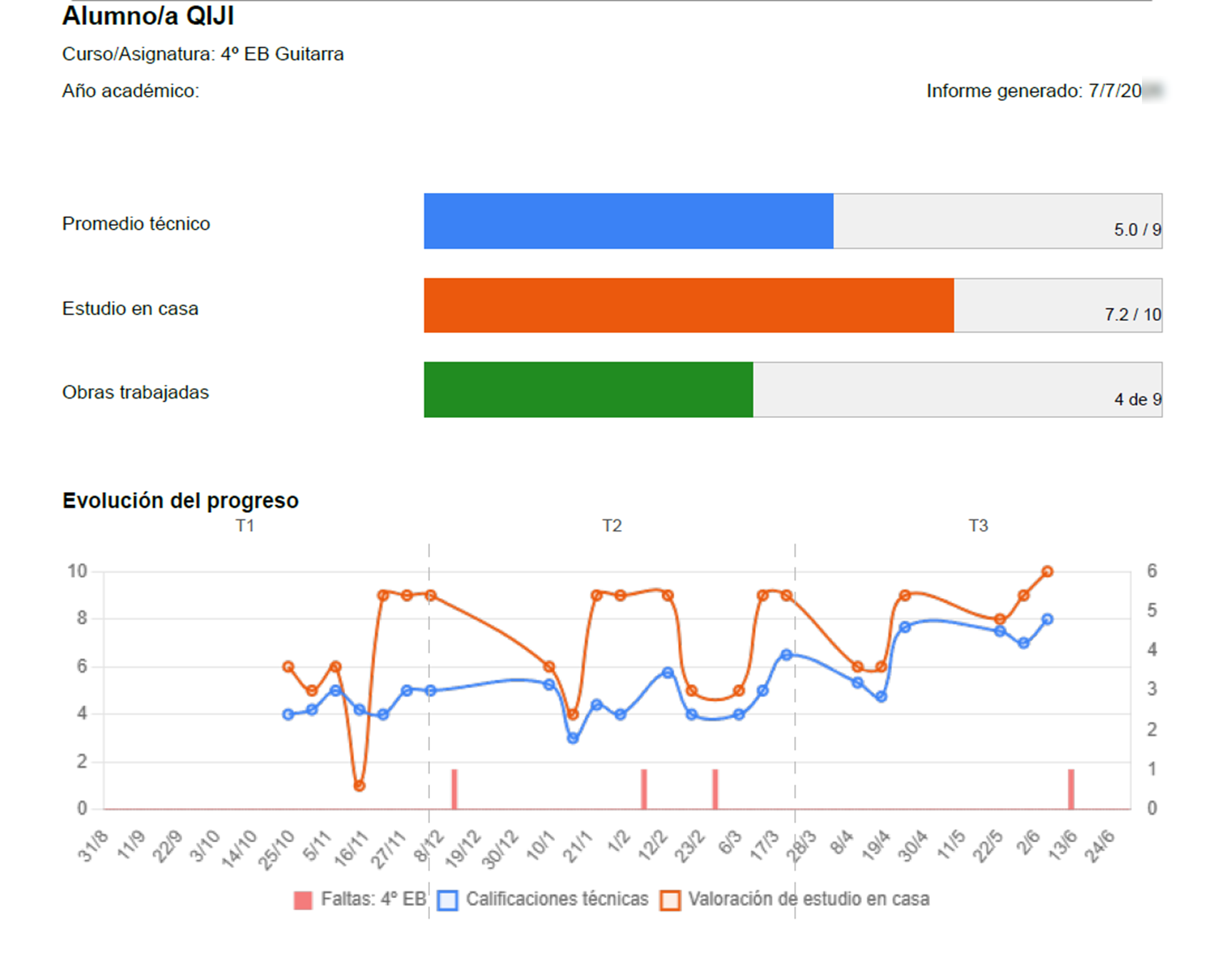
Example of a professional PDF report

Professional PDF Reports for Families and Meetings

Generate class histories and progress summaries ready to print or send digitally. Present objective and impeccable data in your meetings with parents or the Head of Studies.
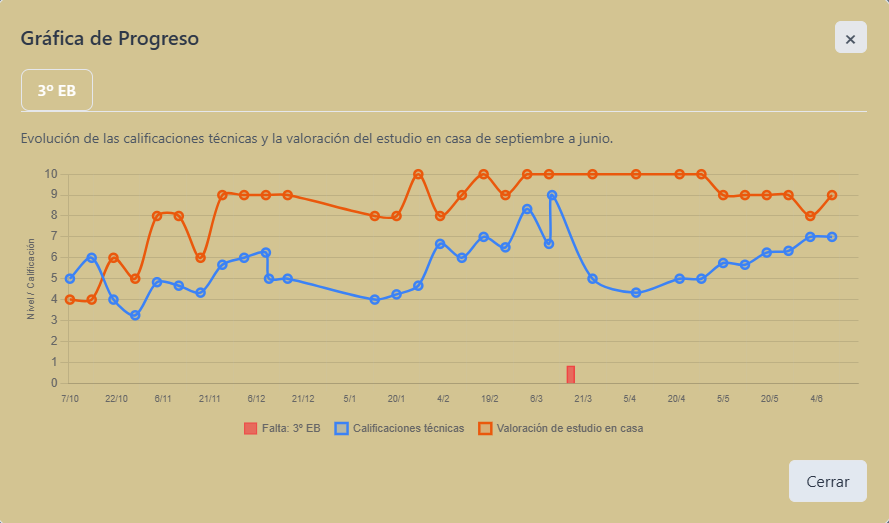
A student's progress chart

Visualize Technical Evolution at a Glance

No more doubts when assigning term grades. Our detailed charts cross-reference weekly technical ratings with at-home study consistency to reflect the student's real progress.
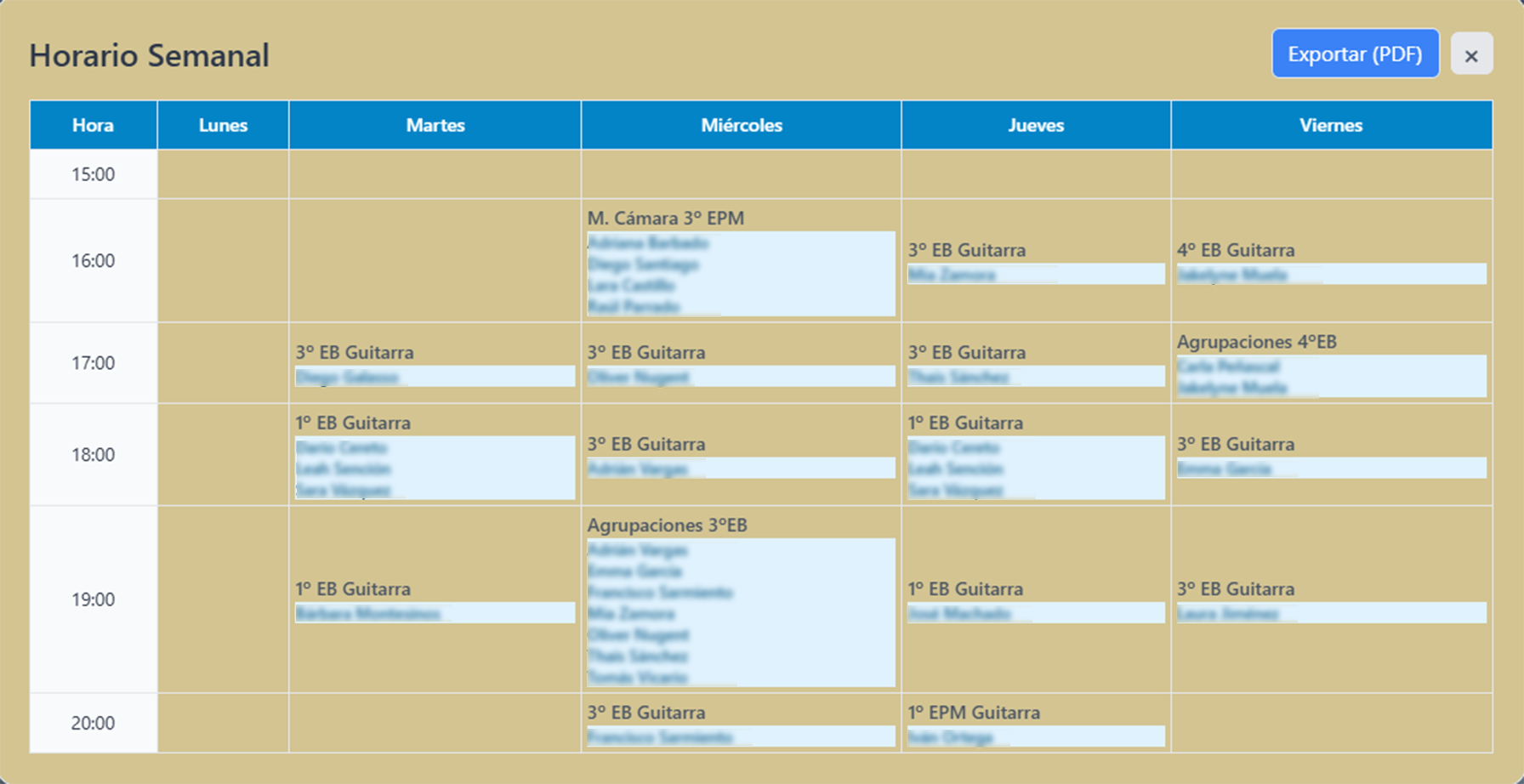
View of the weekly class schedule

Interactive Weekly Schedule and Touch-Friendly Logging

Organize your schedule automatically, spot free slots, and log what you've worked on at the end of each class in a couple of taps from your phone. It works smoothly and without complications.
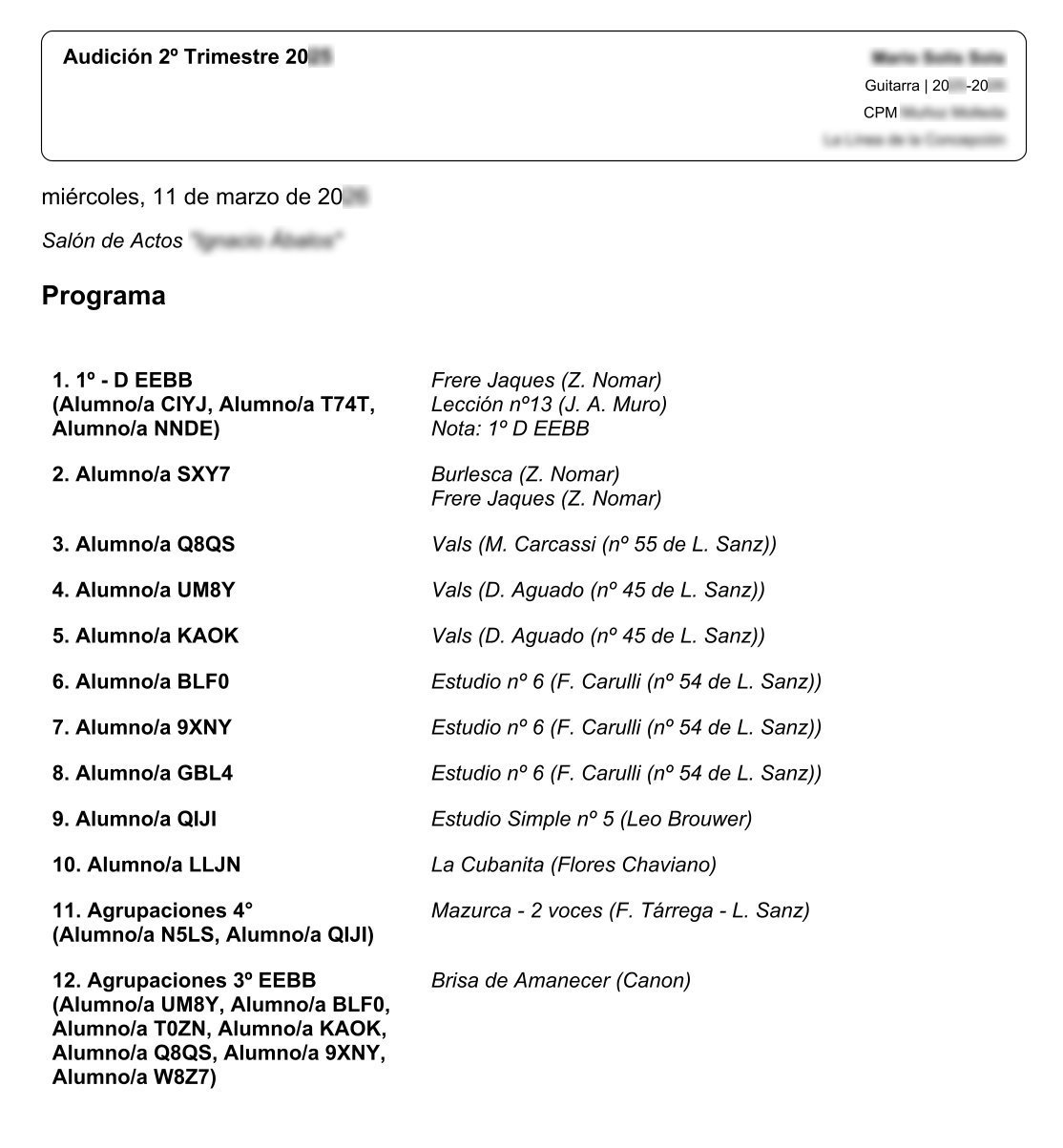
An audition program ready to print

Audition Manager and Automatic Programs

Organize the course's auditions from a single place. The app automatically lays out and generates the program in PDF with a professional header, ready to print before the concert.
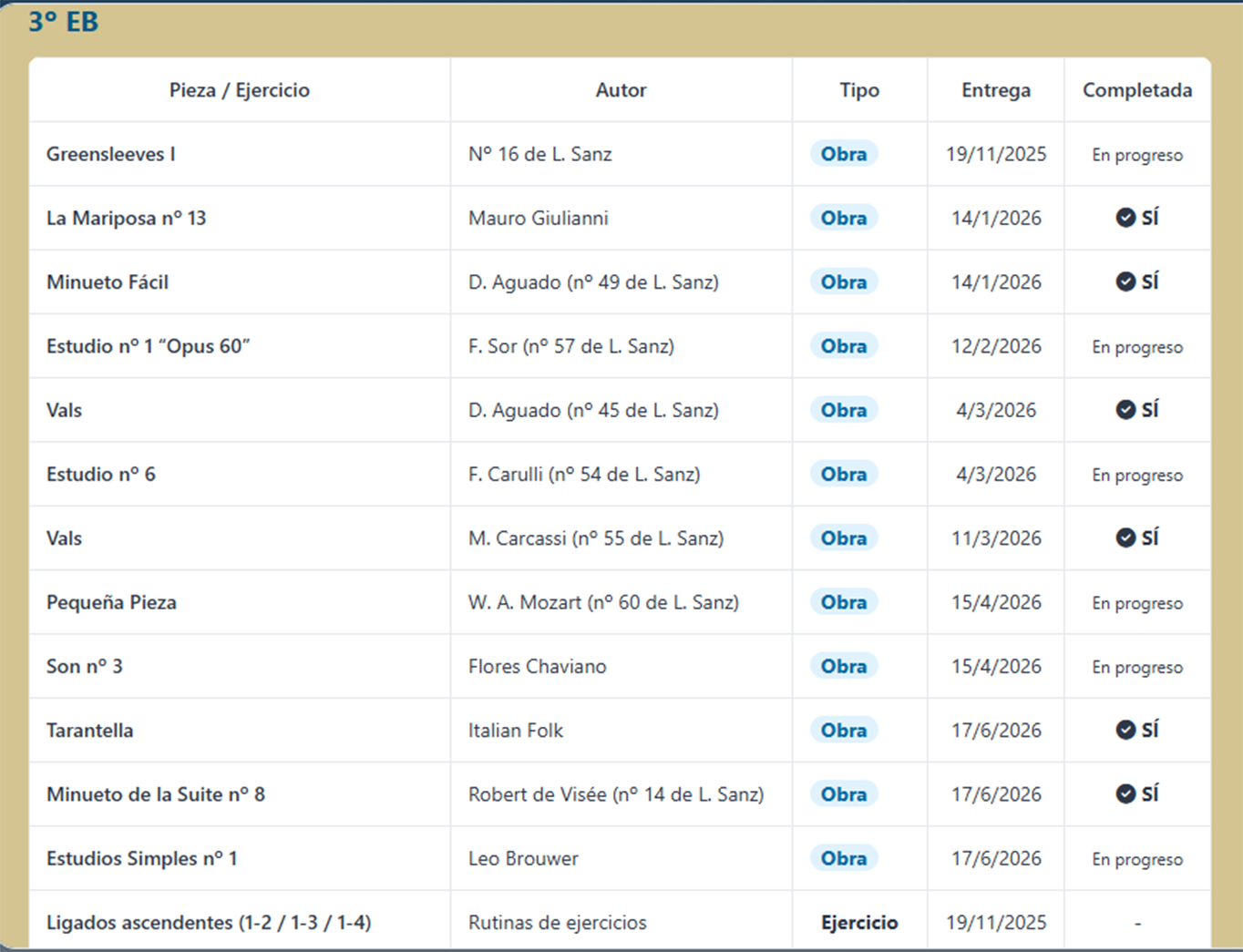
List of pieces worked on by a student during the course

Repertoire and Worked Pieces Tracking

Keep a precise record of all the works and exercises studied by each student during the course, including dates and completion status. You'll never have to rely on memory alone again.

An In-Depth Look

Explore the real workflow, from initial setup to report generation and audition management.

Your Conservatory in Your Pocket or on the Big Screen

No heavy downloads or App Store commissions. Install it directly on your device and access it even if you lose signal in the classroom.

On Mobile or Tablet (iOS / Android)

  1. Open the website in your browser (Safari on iPhone, Chrome on Android).
  2. Tap the Share button or the options menu .
  3. Select "Add to Home Screen".
  4. Done! Instant direct access like a native app.

On Desktop (PC / Mac)

  1. Open the website in Google Chrome or Microsoft Edge.
  2. Click the Install icon in the address bar.
  3. Accept the installation.
  4. You'll have a standalone application on your desktop to work comfortably in full screen.

Choose the Plan That Best Fits Your Classroom

No commitments or hidden fees. Try it for free for as long as you need.

Free Plan

€0

Ideal for trying out the workflow

  • Up to 3 students
  • Up to 15 classes per student
  • Grade and attendance logging
  • Basic Repertoire Manager
  • Limited Audition Manager
  • No PDF Report exports
  • No progress charts
  • No weekly schedule
MOST POPULAR

Premium Plan

€2 / month

Billed annually at €24/year

  • Everything in the free plan, plus:
  • Unlimited students and histories (Up to 150/year)
  • Professional PDF reports for meetings
  • Quarterly technical progress charts
  • Programmable and interactive weekly schedule
  • Audition program generator ready to print
  • Export and backup your data
  • Priority support from a fellow teacher

Frequently Asked Questions

Who is behind Digital Diary?

I'm an instrument teacher at a conservatory. I created this application independently to solve my own classroom needs and those of my colleagues. There are no intermediaries or large corporations behind it: just a teacher helping other teachers.

What happens to student data if I stop using the app?

Your data is 100% yours. At any time, you can export your records or request the permanent deletion of your account and all stored information in accordance with data protection regulations (GDPR).

How is the data of minors protected?

The application allows you to work anonymously or use codes/initials for student identification if your institution requires it. PDF exports and lists include specific options to hide last names or sensitive data.

Can I use the application without an Internet connection?

Yes! By installing it as a Progressive Web App (PWA) on your mobile, tablet, or computer, you can consult and log information in classrooms without signal or in conservatory basements. It will automatically sync as soon as you regain connection.

I have a question or need help, how can I get in touch?

You can send me a message directly through our contact and technical support form (in Spanish). I will personally respond to all your inquiries.